
The OSINT Newsletter - Issue #112
OSINT Tool Tuesday: EyeDex
👋 Welcome to OSINT Tool Tuesday. This week we’re looking at EyeDex; a robust open directory search engine designed to help investigators discover publicly accessible files, archives, documents, media, and datasets exposed across the internet. Widely used by researchers, archivists, investigators, and data hoarders, EyeDex indexes massive amounts of publicly accessible directory content and makes it searchable from a single interface.
🚨 This tool has been added to the OSINT Resources for Open Directories page on The OSINT Newsletter for easy reference later. That list serves as a roadmap for new tutorials in the future. If there are any tools you’d like to see added to the list and covered, please reach out to jake@osint.news with details.
🪃 If you missed the last newsletter, here’s a link to catch up.
⚡ You’re Hired: OSINT and Company Intelligence

🎙️ If you prefer to listen, here’s a link to the podcast instead.

Let’s get started. ⬇️
EyeDex
EyeDex is an open directory search engine that indexes publicly accessible web directories and allows users to search across petabytes of exposed files hosted on open servers around the world. It acts as a search layer over open directories, making it easier to locate documents, images, videos, archives, datasets, logs, software, and other files that would otherwise be difficult to discover manually.
🎩 H/T: eyedex
EyeDex allows investigators to search using keywords, file names, file extensions, file groups, indexed server paths, and directory structures.
The platform is especially useful for:
Discovering forgotten or abandoned public data.
Locating leaked or exposed files.
Identifying publicly accessible infrastructure.
Finding archived datasets and documents.
Pivoting into additional OSINT investigations.
In this guide, I’ll walk you through how EyeDex works, how to search effectively, practical use cases, and additional search techniques to help uncover further results.
Setup
Unlike many OSINT tools, EyeDex does not require installation or API access. It’s entirely web-based, so simply open up the EyeDex Search Interface and you’re good to go. (Command-line beginners can collectively breathe a sigh of relief!)

Understanding Open Directories
Before using EyeDex effectively, it helps to understand what “open directories” actually are.
An open directory is a publicly accessible web server directory listing where indexing or browsing has been enabled accidentally or intentionally. These often expose PDFs, ZIP archives, videos, source code, backups, configuration files, images, logs, and datasets.
In many cases, these directories were never intended to be publicly searchable. EyeDex indexes these locations and makes them searchable from a central interface.
Note: As always, just because a file is publicly accessible doesn’t mean you should download, distribute, or misuse it. Always operate legally and ethically.
Usage
Now that we’ve covered the basics, let’s dive into how to actually use EyeDex during investigations.
Basic Search
The best place to start is by searching for keywords. You could try a company name, username, project codename, email domain or file name to name but a few.
Example: osint
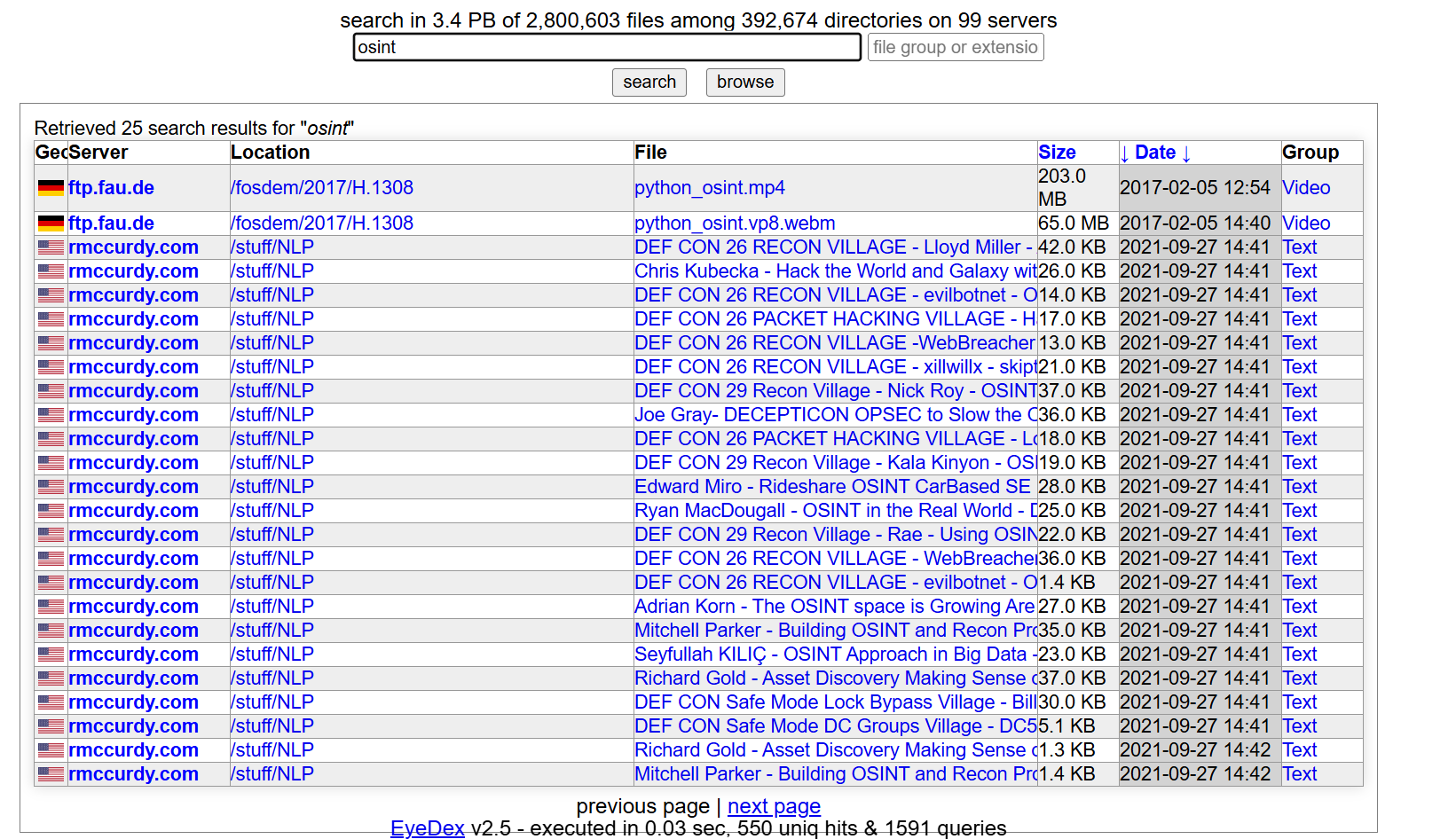
This may uncover exposed PDFs, archived backups, spreadsheets, internal documentation etc.
As you can see, search results typically include file name, server, location, file size, modification group, and file category e.g. ‘video’ or ‘text’.
🗒️ This is the best starting point for broad reconnaissance.
File Extension Searches
One of EyeDex’s most powerful features is searching by file extension e.g. pdf, sql, txt, log, json, csv etc. You can also combine keywords with extensions.
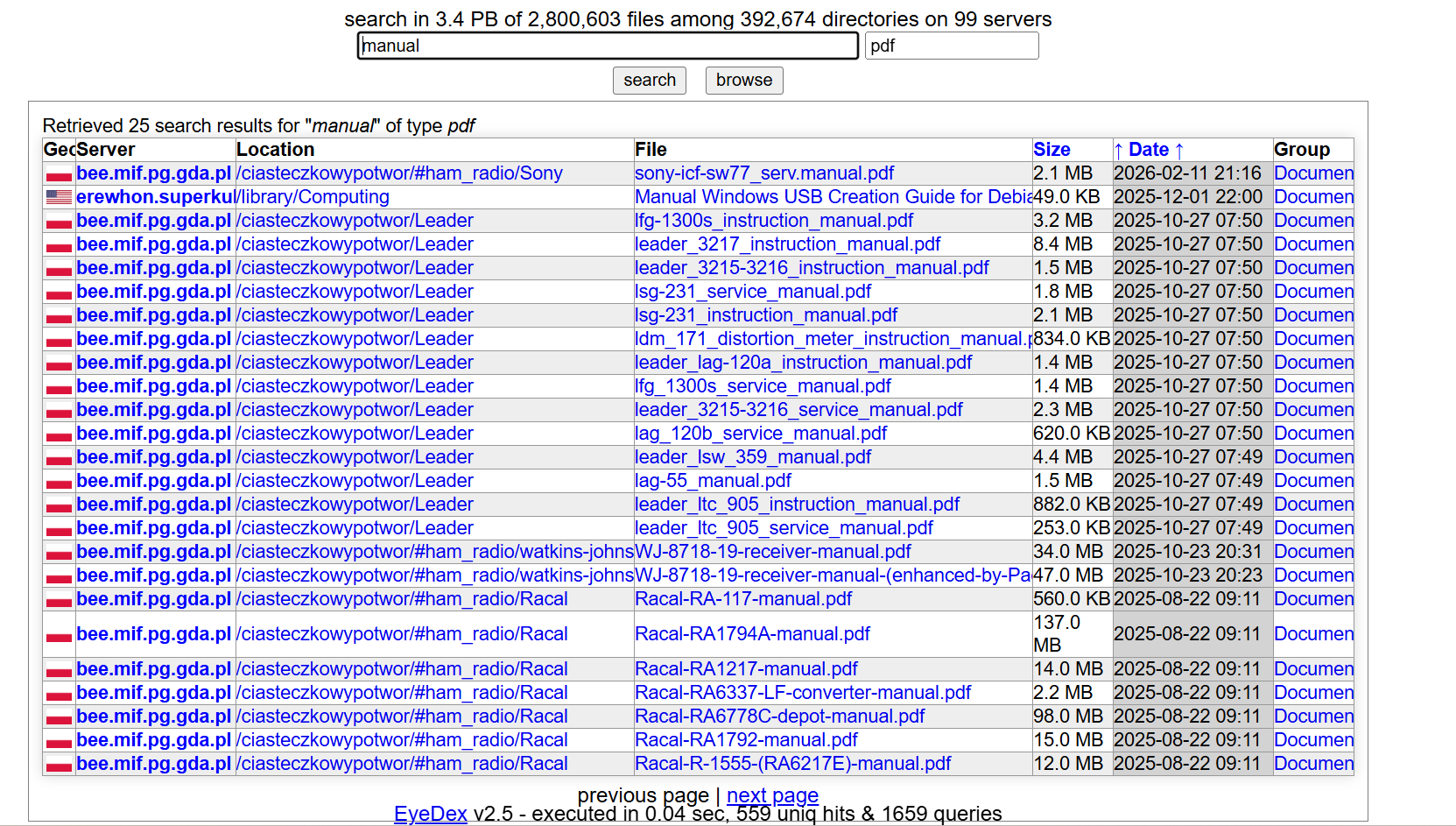
Example: Manual pdf
This is of course a very wide search query but you can see how it pulls up more recent pdf manuals. Using this feature can help narrow investigations toward specific file types.
🗒️ Extremely useful for identifying accidental data exposure.
File Group Filtering
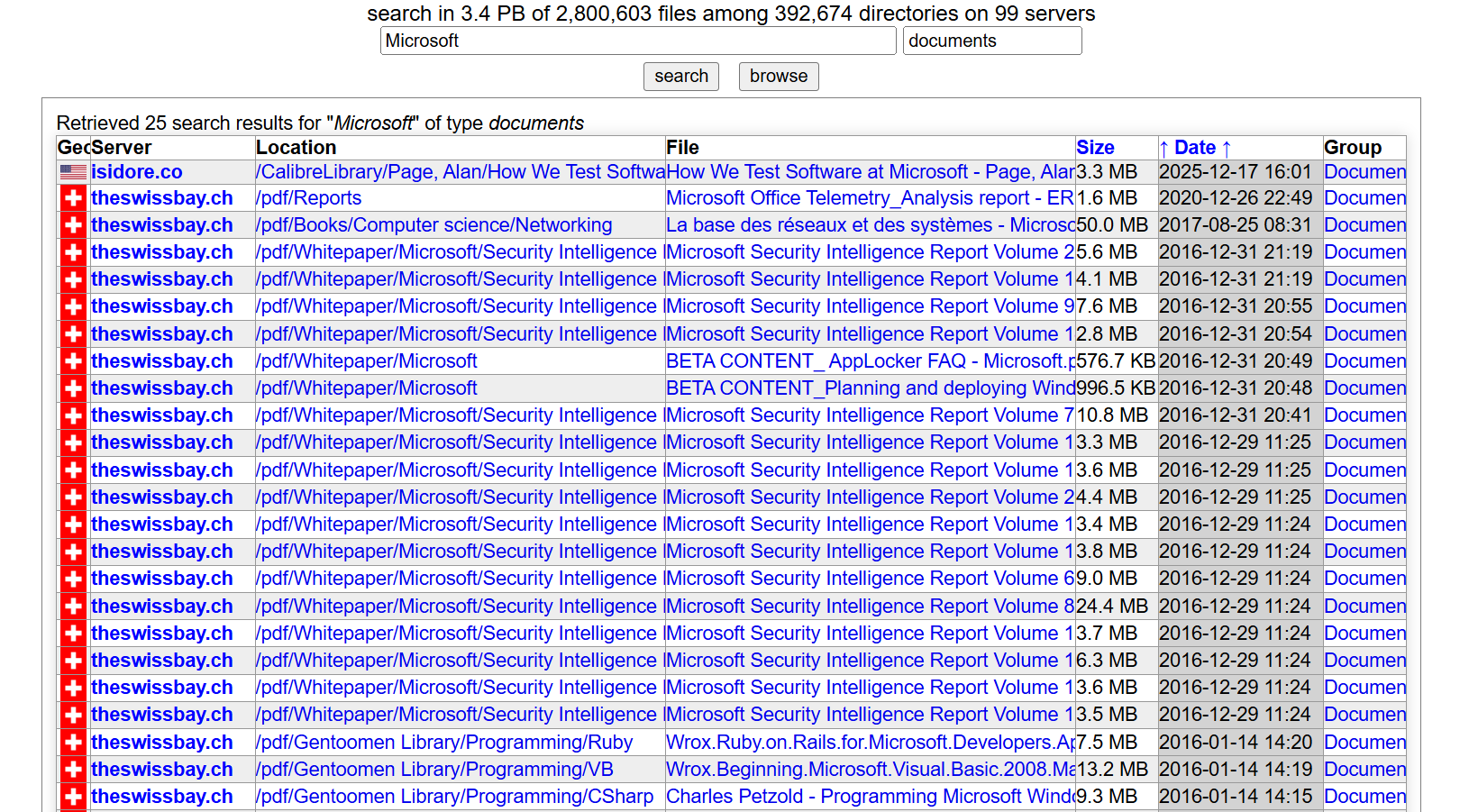
EyeDex allows filtering by file groups/categories including documents, archives, pictures, text and video. This makes it easier to quickly pivot toward the type of content you’re investigating.
Example workflow:
Search a company name.
Filter by “Documents”.
Review exposed PDFs and spreadsheets.
Server Pivoting
One underrated feature of EyeDex is the ability to pivot into entire exposed directory structures. Once you identify a useful result, you can inspect adjacent folders, browse sibling directories, identify naming conventions, and uncover additional hidden files.
This often reveals:
staging environments
old backups
developer files
forgotten exports
archived media
🗒️ Many investigations expand significantly through directory pivoting rather than the initial keyword search itself.
Date Sorting
EyeDex allows sorting by date (and time), helping investigators identify recently modified files, fresh uploads, newly exposed data, and active infrastructure.
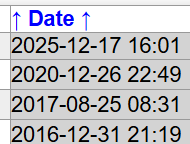
It may be a simple feature but this is especially useful during breach monitoring, leak investigations, threat intelligence monitoring, and ransomware tracking.
Infrastructure Discovery
Because search results expose server paths and hostnames, EyeDex can also support infrastructure investigations.
Results may reveal subdomains, internal naming conventions, CDN structures, storage buckets, legacy infrastructure, and mirrored servers.
These become valuable pivot points into:
DNS investigations
Shodan searches
Certificate analysis
Passive DNS
Attack surface mapping
Use Cases
EyeDex is essentially a public file discovery and exposed infrastructure reconnaissance tool.
A key feature is its ability to support structured exploration of results and build a clearer picture from scattered publicly available information.
So where exactly is this tool useful in OSINT?
Data Exposure Discovery
This is arguably the primary use case as EyeDex can help investigators locate exposed backups, exported databases, internal documents, logs, and misconfigured storage. This can support breach investigations, attack surface monitoring, corporate reconnaissance, and vulnerability research.
Threat Intelligence
Threat researchers can use EyeDex to identify leaked datasets, locate malware samples, discover exposed infrastructure, uncover staging servers, and track threat actor file hosting. Open directories are frequently used for malware hosting, phishing kits, leaked credential storage, and pirated tooling.
Note: Always exercise caution when interacting with downloadable content.
Research & Archiving
EyeDex is also widely used by archivists and researchers looking for old software, datasets, scanned books, historical archives, and niche media collections. The open directory community has long used similar indexing techniques for archival discovery.
Corporate Reconnaissance
Security teams and investigators can use EyeDex to identify exposed internal documents, forgotten staging environments, publicly accessible backups, and leaked configuration files. This makes the tool valuable for red teaming, attack surface management, and external exposure assessments.
Operational Security Considerations
When using open directory search engines:
Never execute unknown files directly.
Avoid downloading executables from untrusted sources.
Use isolated analysis environments/sandboxes.
Verify hashes when possible.
Treat exposed files as potentially malicious.
The wider OSINT and open directory community frequently warns about operational security risks associated with random downloads from exposed servers so in big, bold letters, EXERCISE CAUTION.
Additional Tips
Here are a few practical ways investigators improve EyeDex searches:
Search by extension:
sql
csv
Combine keywords:
company confidential
Search for backups:
backup zip
bak
Search usernames:
jdoe
Search infrastructure terms:
vpn config
Search exposed logs:
access.log
error.log
Search by media type:
Use file group filters to narrow results quickly.
🏁 New CTF Challenge Live - Monaco Suspect
A new CTF challenge has been posted on our CTF website. This week’s challenge involves geolocating the exact location of the Monaco explosion suspect using only a single CCTV image provided as evidence.
Start competing in our Capture the Flag (CTF)
🪃 If you missed the last CTF, here’s a link to catch up.
Last week’s CTF challenge featured a challenge titled “Disguised Fuel Convoy” where participants were tasked with locating a blurry video showing Russian occupying forces driving a disguised fuel convoy transporting fuel to Crimea.
Challenge solution WU :
Looking at the video and making regular pauses, we can notice several visual clues.
First of all a crosswalk, if we look closely we can notice the presence of a communication tower and a memorial-style sign.
At the end of the video we can hear the man recording, say that it’s in Kerch (city).
Using overpass turbo and applying filters to search for gas stations near a crosswalk and a communication tower we get a few results.
Comparing all of them with what we see in the video, only one of them matches perfectly when taking a look at sat imagery. The crosswalk is present and matches the video, the memorial-style sign is present too. (45.3397564 / 36.4044172)
Finally the gas station is also present and looking at OpenStreetMap in overpass turbo we can see that the name of the gas station is ATAN, and that the name of the nearest bus station is Дачи.
Overpass Turbo Query:
[out:json][timeout:180];
// Kerch (Kertch)
{{geocodeArea:Kerch}}->.a;
// stations essence
nwr“amenity”=”fuel”->.fuel;
// passages piétons proches des stations
node”highway”=”crossing”->.cross;
// antennes proches des stations
(
node”man_made”=”tower”;
node”tower:type”=”communication”;
)->.ant;
// sortie
(
.fuel;
.cross;
.ant;
);
out center;
✅ That’s it for the free version of The OSINT Newsletter. Consider upgrading to a paid subscription to support this publication and independent research.
By upgrading to paid, you’ll get access to the following:
👀 All paid posts in the archive. Go back and see what you’ve missed!
🚀 If you don’t have a paid subscription already, don’t worry. There’s a 7-day free trial. If you like what you’re reading, upgrade your subscription. If you can’t, I totally understand. Be on the lookout for promotions throughout the year.
🚨 The OSINT Newsletter offers a free premium subscription to all members of law enforcement. To upgrade your subscription, please reach out to LEA@osint.news from your official law enforcement email address.